An app budget starts with what someone needs to accomplish. “A booking app” might mean choosing an available time, or it might include memberships, payments, cancellations, staff overrides and reminders. Those are different builds even when the booking screen looks similar.
At westcode.io, we agree a scope and fixed price before development starts. This guide explains how to prepare that scope and compare quotes. We do not publish client project fees or treat a generic price range as a quote for your app.
Separate the build from the cost of running it
Ask for a budget with three parts. Keep optional additions separate so you can change the first release without losing track of the essentials.
| Part | What to include | What to ask |
|---|---|---|
| First release | Design, app, backend, admin tools, testing and launch preparation | Which complete journeys will work at handover? |
| Recurring services | Hosting, storage, email, messaging, developer accounts and paid integrations | Who pays each bill, in which currency, and what changes with usage? |
| Ongoing work | Bug support, platform updates, monitoring and future features | What is covered after launch, and how is additional work priced? |
For a Canadian business, confirm whether each quote is in CAD, whether taxes are included and which suppliers bill in another currency. Compare the same scope before comparing totals.
What changes the price: examples from our work
Founder Feast: a reservation needs an operational system
Members discover dinners and reserve seats in the Founder Feast app. Behind that are applications, memberships, payments and tools for managing dinners and seating.
A quote that includes only the member-facing screens would miss much of the product. The scope needs to explain who creates events, changes reservations and resolves exceptions. That is why we ask about the team running the service alongside the person using the app.
Captain Plumber: the existing system matters
Captain Plumber’s website and mobile app serve different users. Customers find plumbing services on the website; the team uses the app for clients, quotes, invoices, service reports and leads.
The QuickBooks connection adds questions a standalone screen does not answer: which system owns each record, what happens when a sync fails, and how staff correct a mistake. Include those decisions and their testing in the quote.
RetireMint: more than a questionnaire
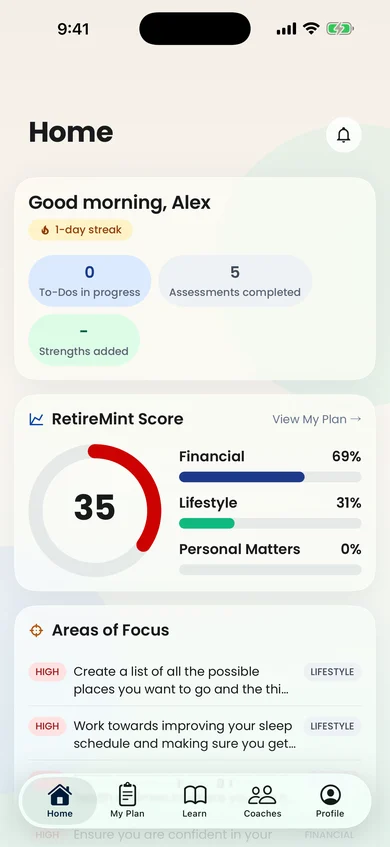
RetireMint brings assessments, results, learning resources and a directory of retirement professionals into a website and mobile app. The work includes the rules behind the results and the relationship between assessment progress and next steps.
For an assessment product, define who supplies and approves the questions, scoring rules and explanatory content. A working interface cannot settle those product decisions for you.
Decide which features earn a place in version one
Write down the smallest complete journey a real user could finish. Then work backwards to the permissions, data and operational tools it needs.
For a booking product, that could be: sign in, see availability, reserve, receive confirmation and cancel. A staff member also needs a way to resolve a reservation problem. Recommendations, referral rewards and advanced reporting may be later additions.
“Later” should mean deliberately postponed, with the consequences understood. For example, postponing an automated report may create a manageable manual task; postponing account recovery may prevent someone from using the product at all.
Compare platform choices against actual requirements
A shared mobile codebase can reuse work across iOS and Android, but both platforms still need testing and release preparation. Separate native builds may suit particular device features or an existing engineering team. A web app can be enough when users mainly need an occasional form or portal.
Ask the developer to demonstrate the hardest part of your app before choosing a framework. Offline work, hardware connections and unusual camera behaviour deserve more attention than a standard profile screen. Our guide to choosing a first product format covers that decision.
A brief you can send for a useful quote
- Users: who uses the app, and who manages it?
- Main task: what should a person be able to finish?
- Platforms: where do those people need access?
- Existing systems: what must the app connect to?
- Content: what is ready, and who supplies the rest?
- Exceptions: what happens when a payment, connection or booking fails?
- Budget and deadline: what constraints should shape the first release?
- Handover: what code, accounts, documentation and support do you need?
If you already have proposals, use our app quote comparison checklist to find differences in what they include.
Get a scope for your app
Send us that brief, even if some answers are still open. We can work through the uncertain parts and agree on a first release before quoting. See our app-development service, or tell us what you want to build.